Showing posts with label Java. Show all posts
Showing posts with label Java. Show all posts
Wednesday, October 15, 2014
Next step selecting an alternate programming language
Ok it's down to ADA or Object Pascal (the Free Pascal compiler). I still have to check the license for FP in more details but it looks good. Two languages that have compilers on several platform and libraries to go along. I have worked with Turbo Pascal and Delphi years ago and the Free Pascal version of the language is a very close clone of Delphi so the learning curve should not be too bad. I have played a little with ADA and so far I think the language has very interesting features. I might actually start a more detailed thread about my ADA experimentations.
What do you think ? Does anyone out there have any comments about either language ?


Tuesday, July 29, 2014
Is Python a possible alternative for Java
One of the language I evaluated as an alternative to Java of course was Python despite my hatred for languages that have significant white spaces. I did not get very far. In general, the syntax of the language is ok (except for whitespace) but the problem is speed. CPython is terribly slow as in unacceptably slow so I looked at PyPy since this uses a JIT compiler. No luck. It is better that CPython but it is not a substitute for it. You simply cannot assume that the program you ran in CPython will run with PyPy. Some libraries do not run with the JIT and there are a few other incompatibilities. So, Python will not be the successor for Java in my book.
What would be your choice of multi-platform open source programming language (really open source - no license for embedded systems) ?
Monday, July 21, 2014
Finding an alternative for Java
Some people at work question the use of Java as our main programming language. Since I am not a Java language fanatic I welcome the discussion however, several of the arguments mentioned against Java simply do not resist close scrutiny. Speed when compared to C/C++ ? JIT compiled Java speed is very close to C/C++ and the problems we have encountered in the past where speed was a problem were mostly related to I/O or ... bad design. Verbosity when compared to other languages ? Not such a big problem since the IDE handles most of the scaffolding (the infamous curly brackets, etc ...) and Java 8 removes some of the verbosity. Certainly not worth switching language specially when you consider the advantage of Java. Advantages that include: an incredible ecosystem of tools an libraries, a very good specification, several of the advantages of modern languages such as Garbage Collection and good support for multi-core processors. In fact, since I love programming languages I did try to find a good alternative because of the license issue. Having to pay for a license on embedded systems is a problem when trying to cut cost. Finding a viable lower cost alternative is not obvious. More on this in the next blog.
Wednesday, December 25, 2013
Another reason to use Netbeans instead of Eclipse
A couple of weeks ago I stumbled on a post by another Eclipse fanatic. The insect ... oups, blogger, was making fun of people using Netbeans. Well, fortunatly for him there was no comments or reply button on the page because I would have replied and my comment would have been difficult for him to handle:
You might like the chaotic and always in beta look and feel of Eclipse however the biggest problem with Eclipse is its buggy Java compiler.Some people don't even know this but Eclipse has his own "internal" Java compiler. Netbeans on the other hand uses the JDK supplied compiler. Eclipse's compiler has one advantage over the one in the JDK and that is the granularity of the compiled elements. Eclipse will compile and "link" smaller pieces of code. In a few cases where you have to stop debugging and restart in Netbeans, Eclipse will simply recompile the small bit of modified code and keep the debugging session alive. The problem however is that the last time I looked there was still a bug in the compiler forcing us to add useless class cast in generic code. To that you might respond that it is not such a big issue. My response to this would be: well one of the benefit of generics is to remove the need for a lot of type casting in the code so for me it is important. My other response to this would be that it is not the only problem with the Eclipse Java compiler. The reason I switch to Netbeans despite Eclipse being the standard where I work is that for a while in the transition to Java 1.7 the Eclipse compiler would simply not compile my project. This was eventually fixed (a week later) but I simply could not wait a whole week without a working IDE so I switched to Netbeans. I have no problems with that because I have always preferred Netbeans to Eclipse. Aside from what I would call the objective argument (an IDE should compile the code correctly) there is of course a subjective side to my preference for Netbeans. I prefer the more static placement of the Netbeans windows and views. It is flexible enough for me and without feeling chaotic like Eclipse. Also, Netbeans was in front of Eclipse supporting the preview version of Java 1.8 and I would not want to be the guinea pig for the 1.8 internal Eclipse compiler.
Sunday, June 2, 2013
The answer to the question at the end of the previous post
What is the answer to the question at the end of the previous post:
What is an API designer to do in such a case ? Well, what we did was define an interface for the steps in the analysis cycle of the CT and implement a kind of Decorator for that in all SM(I) instances. Of course, concrete instances of this interface are provided by the IInstrumentDefinition factory. The main interface for this is something like:
interface IAnalysisSteps
{
void doStep (String stepName);
}
The CT supplies a default implementation of this that is in fact a supertype that looks like this:
interface IAnalysisStepHandler extends IAnalysisStep
{
void skipStep (String stepName);
}
The IInstrumentDefinition interface has a factory method that looks like:
IAnalysisStep getAnalysisStep (IAnalysisStepHandler analysisStepHandler);
The SM(I) implements a version of IAnalysisSteps that will do one of two thing when it gets called:
- Simply call the default implementation of the IAnalysisStepHandler
- Call the skipStep(String) version of the method in the IAnalysisStepHandler
Now SM(I) instances can customize the steps in the CT without actually having to open the code of the CT. What if new analysis steps are added to the CT ? Well, in that case you don't have any choice but to open the CT and to support that you simply have to implement the SM(I) IAnalysisSteps decorator such that if an analysis step is unknown it is skipped. Since this step was originally not present in the CT skipping it should be a good default behavior for old SM(I) instances. I left out some details above like having different parameters for different analysis steps. That however is easily handled using a single additional parameter of type Map<INamedParameter>. If you don't remember what a INamedParameter is simply look at the previous blog entry.
Is using an enum for analyzer family a good way to customize the processing in the client application (CT)Well the answer in the case of our projet was no. The stable part of the application ecosystem was the CT and the analysis cycle step in it. Adding an enum that we would then use to skip step in the processing would have made it impossible for us to add new Analyzer class without opening the code of the CT to support the new class.(remember the OCP or Open Close Principle)
What is an API designer to do in such a case ? Well, what we did was define an interface for the steps in the analysis cycle of the CT and implement a kind of Decorator for that in all SM(I) instances. Of course, concrete instances of this interface are provided by the IInstrumentDefinition factory. The main interface for this is something like:
interface IAnalysisSteps
{
void doStep (String stepName);
}
The CT supplies a default implementation of this that is in fact a supertype that looks like this:
interface IAnalysisStepHandler extends IAnalysisStep
{
void skipStep (String stepName);
}
The IInstrumentDefinition interface has a factory method that looks like:
IAnalysisStep getAnalysisStep (IAnalysisStepHandler analysisStepHandler);
The SM(I) implements a version of IAnalysisSteps that will do one of two thing when it gets called:
- Simply call the default implementation of the IAnalysisStepHandler
- Call the skipStep(String) version of the method in the IAnalysisStepHandler
Now SM(I) instances can customize the steps in the CT without actually having to open the code of the CT. What if new analysis steps are added to the CT ? Well, in that case you don't have any choice but to open the CT and to support that you simply have to implement the SM(I) IAnalysisSteps decorator such that if an analysis step is unknown it is skipped. Since this step was originally not present in the CT skipping it should be a good default behavior for old SM(I) instances. I left out some details above like having different parameters for different analysis steps. That however is easily handled using a single additional parameter of type Map<INamedParameter>. If you don't remember what a INamedParameter is simply look at the previous blog entry.
Wednesday, May 22, 2013
Good software design principles (part 5)
AS you have seen the two main interfaces of the SMF are:
- IInstrumentDefinition: an Abstract Factory that defines methods to get different classes to work with analyzers.
- IInstrument: a Strategy that implements all the steps needed to acquire data from an analyzer. Concrete instances of this are returned by concrete implementation of IInstrumentDefinition dynamically loaded from a .jar file.
The only class that needs to be public (exported) in the SM(I) .jar is the implementation of the IInstrumentDefinition
Now, how do you customize the behaviour of the client application (CA) to work properly with a given SM(I) ? After all, the steps in a analysis sequence of the CA might not all be appropriate for the data returned by a given SM(I).
Would having a method that defines an analyser family be a good idea ? Something like:
Family getFamily()
Where Family would be an enum. Something like:
public enum Family
{
FTIR,
PARTICLE_COUNTER,
MASS_SPECTROMETER
}
Is this a good idea ? Think about this in light of the OCP.
- IInstrumentDefinition: an Abstract Factory that defines methods to get different classes to work with analyzers.
- IInstrument: a Strategy that implements all the steps needed to acquire data from an analyzer. Concrete instances of this are returned by concrete implementation of IInstrumentDefinition dynamically loaded from a .jar file.
The only class that needs to be public (exported) in the SM(I) .jar is the implementation of the IInstrumentDefinition
Now, how do you customize the behaviour of the client application (CA) to work properly with a given SM(I) ? After all, the steps in a analysis sequence of the CA might not all be appropriate for the data returned by a given SM(I).
Would having a method that defines an analyser family be a good idea ? Something like:
Family getFamily()
Where Family would be an enum. Something like:
public enum Family
{
FTIR,
PARTICLE_COUNTER,
MASS_SPECTROMETER
}
Is this a good idea ? Think about this in light of the OCP.
Monday, May 13, 2013
Good software design principle part 4
Another thing that was a big success in the SMF was the use of List and Map(s) (Dictionary in .net). If a class looks like a List, smells like a List and sounds like a list then it probably is a List. This might sound trivial but I have seen project where a class with getters and setters was defined to handle a concept that obviously was a Map. People had to constantly update the interface when new properties where added and the whole thing really was a nightmare. Using data structures such as Lists and Maps makes programming in Java feel much more like dynamic programming. So the IInstrumentDefinition includes a number of methods that actually return unmodifiable Maps. The Maps are generic Map<String, INamedParameter> where the INamedParameter interface is a little one element heterogeneous container. The INamedParameter defines the name, class and value of a parameter or variable. A Map of those is a nice little package that can easily give access to the List<String> of INamedParameter names. Once you have the name you can get the actual INamedParameter from the Map.
Saturday, May 11, 2013
Good software design principle part 3
In the previous post I gave a summary of the problem to be solved using the Successful Module. I explained that in fact the problem is solved using a Successful Module Framework (SMF) and Successful Module Instances SM(i). The SMF is a library used by the client application (CA) and the SM(i) to interact with each other without building cumbersome circular references and dependencies. In Java all modules are .jar files. At compile time both the CA and the SM(i) know the SMF but they don't know each other. Of course at runtime the CA needs to know how to load the SM(i) but that information is limited to the file location. Once it is loaded the CA interacts with the SM(i) as if it consisted only of classes (more precisely interfaces) defined in the SMF.
The CA loads the SM(i) .jar and looks for a class that implements an interface called IInstrumentDefinition that marks it as the point of entry into the module. In fact the CA knows only interfaces (pure abstract classes in C++) defined in the SMF. This is one of the key to the success of the whole project. No concrete classes in the API. To understand what the IInstrumentDefinition is we need to enumerate some of the interaction between the CA and an analyzer. The CA needs to:
1- Define the value of parameters used by the analyzer (resolution, number of scan, etc...)
2- Find the list of values that a particular analyzer can supply (the data it can return, etc...)
3- Start an acquisition
4- Read the status of the analyzer
5- Read the data at the end of an acquisition cycle
So. Does the IInstrumentDefinition need to supply operations (methods) related to all these interactions ? No, not at all. In fact it turns out that many of the operations listed above are defined in a separate class called an IInstrument. Things like operation 3, 4 and 5 are defined in the IInstrument. We found that in practice it was very useful to have a specific interface - the IInstrumentDefinition - to define the functions that would provide the more "static" information about an analyzer and that it made sense that this interface be the entry point into the module. We also identified another very important function of the IInstrumentDefinition: Abstract Factory.
The instrument definition is a factory for a host of classes used when interacting with a specific analyzer. Of course the most important of the factory method is the getInstrument() method that returns a IInstrument.
1- Define the value of parameters used by the analyzer (resolution, number of scan, etc...)
2- Find the list of values that a particular analyzer can supply (the data it can return, etc...)
3- Start an acquisition
4- Read the status of the analyzer
5- Read the data at the end of an acquisition cycle
So. Does the IInstrumentDefinition need to supply operations (methods) related to all these interactions ? No, not at all. In fact it turns out that many of the operations listed above are defined in a separate class called an IInstrument. Things like operation 3, 4 and 5 are defined in the IInstrument. We found that in practice it was very useful to have a specific interface - the IInstrumentDefinition - to define the functions that would provide the more "static" information about an analyzer and that it made sense that this interface be the entry point into the module. We also identified another very important function of the IInstrumentDefinition: Abstract Factory.
The instrument definition is a factory for a host of classes used when interacting with a specific analyzer. Of course the most important of the factory method is the getInstrument() method that returns a IInstrument.
Saturday, April 27, 2013
Good software design principles part 2
For the benefit of this blog we will call the module mentioned in the previous post the SM for successful module. Remember that the objective for this module was to make our software capable of acquiring and analysing data from any third party instrument. When thinking about a problem like this many of you might immediately think about the Open Close Principle. If you did not think about this and/or if you do not know what the OCP is, here is a definition:
Trying to satisfy the OCP has a number of implication. One of them is that you should not have to modify the application code each time you want to support a new instrument. So of course the first thing that was decided was that the module should be loaded dynamically at runtime based on information in the application configuration. This is not earth shattering or revolutionary but it is a very useful concept. What we will be doing with the SM is to build a plugin infrastructure for our application instrument interface. Plugin are used in Eclipse, Netbeans and a whole menagerie of applications. In Java this is easy to do you just pack your SM in a .jar. Now the tricky par is to define the API that this jar file should implement. Another more immediate task is to define how the whole thing will be structured in terms of module. Now from the discussion we know that the starting point is this:

Now with a project like this you want to get your dependencies right from the beginning. In the case of this project it is easy to understand that has illustrated on the diagram communication between the two module goes both way. The Application supplies the SM with parameters and possibly other information and the SM returns statuses and results to the Application. We will probably need to allocate objects and possibly implement interfaces on the application side as well as in the SM. The question then is: where do we define those classes and interfaces ? The answer is: in a third module. Now the high level view of the project looks like this:

Now except for the weird looking arrow the elements on that diagram are packages with their dependencies. You have:
1) Application.
2) SM(I). This is a specific SM Instance (I added the I between parentheses to highlight that).
3) SMF the Successful Module Framework
As you can see there is no circular dependency in the standard UML elements. At compile time the APplication depends only on the SMF and the SM(I) also knows only the SMF. Now I added a non UML element (the weird broken arrow not quite connected) to represent the runtime dependencies in the system. I think having this extra arrow makes everything obvious and clean. In my next blog entry we will continue on our analysis of the SM and SMF. In fact for a while the emphasis will turn on the SMF and the key patterns used in that module the most important being:
- Abstract Factory
- Strategy
Now a closing comment. It goes without saying that before you start on a project like this a good analysis and requirements definition phase is in order. This is beyond the scope of the current thread but we might come back to this or insert a few blog entries about this phase later.
software entities (classes, modules, functions, etc.) should be open for extension, but closed for modificationHere is a link to the Wikipedia article: OCP
Trying to satisfy the OCP has a number of implication. One of them is that you should not have to modify the application code each time you want to support a new instrument. So of course the first thing that was decided was that the module should be loaded dynamically at runtime based on information in the application configuration. This is not earth shattering or revolutionary but it is a very useful concept. What we will be doing with the SM is to build a plugin infrastructure for our application instrument interface. Plugin are used in Eclipse, Netbeans and a whole menagerie of applications. In Java this is easy to do you just pack your SM in a .jar. Now the tricky par is to define the API that this jar file should implement. Another more immediate task is to define how the whole thing will be structured in terms of module. Now from the discussion we know that the starting point is this:

Now with a project like this you want to get your dependencies right from the beginning. In the case of this project it is easy to understand that has illustrated on the diagram communication between the two module goes both way. The Application supplies the SM with parameters and possibly other information and the SM returns statuses and results to the Application. We will probably need to allocate objects and possibly implement interfaces on the application side as well as in the SM. The question then is: where do we define those classes and interfaces ? The answer is: in a third module. Now the high level view of the project looks like this:

Now except for the weird looking arrow the elements on that diagram are packages with their dependencies. You have:
1) Application.
2) SM(I). This is a specific SM Instance (I added the I between parentheses to highlight that).
3) SMF the Successful Module Framework
As you can see there is no circular dependency in the standard UML elements. At compile time the APplication depends only on the SMF and the SM(I) also knows only the SMF. Now I added a non UML element (the weird broken arrow not quite connected) to represent the runtime dependencies in the system. I think having this extra arrow makes everything obvious and clean. In my next blog entry we will continue on our analysis of the SM and SMF. In fact for a while the emphasis will turn on the SMF and the key patterns used in that module the most important being:
- Abstract Factory
- Strategy
Now a closing comment. It goes without saying that before you start on a project like this a good analysis and requirements definition phase is in order. This is beyond the scope of the current thread but we might come back to this or insert a few blog entries about this phase later.
Thursday, April 18, 2013
Eclipse vs Netbeans ... no contest
Everyone is crazy about Eclipse. Me, I just can't stand Eclipse any more. Version 4.x was supposed to bring working multiple editor window but it just is not working. If you use a second editor window (drag an editor tab on a separate screen) the shortcut keys do not work and operations selected in the menu are simply not applied to the correct screen. I don't need billions of plugin. I need a working editor and just like I can't stand single pane file browsers I simply can't stand an editor that does not properly support multiple separate editor window. I spend most of my time editing code so I'm going back to good old clean and stable Netbeans. Which Java IDE should you use ? Well Netbeans of course.
Sunday, January 22, 2012
Writing good static argument validation methods
Before we get into the NullObjectProxy class there is one more prerequisite to get out of the way.
How many times did you have to write the following kind of code:
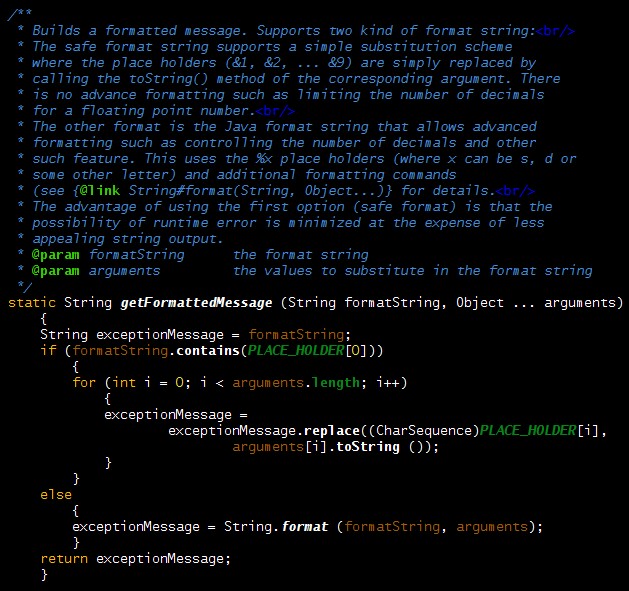
 Here is the getFormattedMessage(..) method:
 Now with this version what you have on each call is that a few arguments are pushed on the stack. You still have annoying side effects though. You still get an Object[] allocated and filled on each call. Also, if you have primitive arguments you get autoboxing of those into primitive wrapper classes (Integer, FLoat, ...). Of course you can further optimize this by having different versions of the method with different primitive arguments. Fortunately it is easy to define such methods for the most common cases. Here is an example with two int arguments:
I was so pleased with this that I added a validateNotNull(boolean, String, Object ...) method:
Ok, now your thinking "that's a lot of trouble for an assert mechanism". The reason I don't use the Java assert mechanism for this is that:
1) I don't want it to be possible to disable those verifications and I want them enabled by default.
2) My Verification class methods have a very usefull trace mechanism build-in. When activated this trace will always get printed even if exceptions are thrown away or lost (handled improperly in thread, ...).
I really like those little methods and I use them a lot. They make it really easy to build meaningful error information reporting into the code.
Of course I will use them in my next blog about my new NullObjectProxy class.
How many times did you have to write the following kind of code:
// Example (1)
if (parameter > limit)
    {
    throw new IllegalArgumentException (
            "'parameter' is too large: " + parameter + " > " + limit);
    }
I decided that I had enough of this and that I wanted to be able to write something like:// Example (2) validate (parameter > limit, "'parameter' is too large: " + parameter + ">" + limit);However, a little thinking made me realize that this form is not really appropriate and would have annoying side effects. In this specific case a bunch of Strings would be allocated and concatenated each time the method is called and that is not good since it would make calling the method very different from the initial code. I did a little more thinking and I came up with:
// Example 3
validate (parameter > limit, "'parameter' is too large: &1 > &2", parameter, limit);
The implementation for this is shown below:

public static final void validate (boolean condition, String formatString,
              int firstValue, int secondValue)
Those methods are defined in a static utility class called Verification and this class contains one and two arguments versions for all primitive number types. Now, the validationFailure(String, Object ...) is called only if the condition fails and so objects are allocated only on failures. We at last have something close enough to the original construct that we can use on a routine basis.I was so pleased with this that I added a validateNotNull(boolean, String, Object ...) method:
// Example (4a)
public static <T> T validateNotNull (T value, String formatString, Object ... arguments)
This is a generic method that will handle any type of reference and return the correct type (no cast needed). I also have a short form for this:
// Example (4b)
public static <T> T validateNotNull (T value, String parameterName)
This short form will print a predefined message:
parameterName should not be nullYou can use those methods like this (short form):
// Example (5)
SomeType localVariable = validateNotNull (parameterOfSomeType, "parameterOfSomeType");
The verification class also contains a number of expect(boolean, String), expect(boolean, String, Object ...) and expectNotNull(Object, String) methods. Those are used to test other conditions that would normally throw IllegalStateExceptions.
Ok, now your thinking "that's a lot of trouble for an assert mechanism". The reason I don't use the Java assert mechanism for this is that:
1) I don't want it to be possible to disable those verifications and I want them enabled by default.
2) My Verification class methods have a very usefull trace mechanism build-in. When activated this trace will always get printed even if exceptions are thrown away or lost (handled improperly in thread, ...).
I really like those little methods and I use them a lot. They make it really easy to build meaningful error information reporting into the code.
Of course I will use them in my next blog about my new NullObjectProxy class.
Monday, August 22, 2011
The Builder and Null Object pattern meet the Java Proxy class
I love the Null Object pattern. It is a simple and useful pattern in many situations. The archetypal example is in the context of JUnit tests (or whatever is your favourite testing framework). In unit tests, Mock objects are often little more than Null Objects. Obviously, there are very good libraries for mocking objects in unit tests and I guess I could use this for Null objects in regular code but that would bring a lot of dead code into my application since those libraries provide some pretty fancy features. I need something simpler.
I have used the Java dynamic java.lang.reflect.Proxy class for things like debugging proxy and other applications so I though using this class for Null Object would be great (if you need a refresher on Java Dynamic Proxy check Explore the Dynamic Proxy API). In fact since a Null object has only one immutable state you only have to worry about the return value of its method. I want to keep this simple so what I will do is I will use two Map(s) in my proxy handler: one with return types for keys (Class) and one with method names for keys (String). This will allow me to define return value for different return types and return values for different method names. This implementation does not support having different return value for methods with the same name and different parameters (overloaded methods). This should not be a big limitation since a Null object is likely to return the same value in this case. Here are the declarations for my Map(s):
 The returnTypeLookup must include values for primitive types since methods that return those cannot default to null. As a bonus the Map includes a consistent set of values for primitive wrapper classes.
The code below shows how the Map(s) are used in the invoke method of my handler:
 As you can see we first check if there is a custom return value for the invoked method name and then we check if there is a custom value for the return type. This makes it possible to handle most common cases where you want to override the default.
Now how can we customize our Proxy ? We could use different constructors for our invocation handler or some extra methods to override values. I have considered several options and finally I think I have found a very elegant solution. Here is what creating a Null object using my API looks like:
To achieve this I use a generic Factory method and a Builder class.In my next post I will show you how to define a class that can be used with such a flexible and programmer friendly syntax.
I have used the Java dynamic java.lang.reflect.Proxy class for things like debugging proxy and other applications so I though using this class for Null Object would be great (if you need a refresher on Java Dynamic Proxy check Explore the Dynamic Proxy API). In fact since a Null object has only one immutable state you only have to worry about the return value of its method. I want to keep this simple so what I will do is I will use two Map(s) in my proxy handler: one with return types for keys (Class) and one with method names for keys (String). This will allow me to define return value for different return types and return values for different method names. This implementation does not support having different return value for methods with the same name and different parameters (overloaded methods). This should not be a big limitation since a Null object is likely to return the same value in this case. Here are the declarations for my Map(s):

The code below shows how the Map(s) are used in the invoke method of my handler:

Now how can we customize our Proxy ? We could use different constructors for our invocation handler or some extra methods to override values. I have considered several options and finally I think I have found a very elegant solution. Here is what creating a Null object using my API looks like:
ISomeInterface r =
	NullObjectProxy.newInstance (ISomeInterface.class)
		.whenReturnType (boolean.class, true)
		.whenMethodName ("someMethodName", new SomeUserDefinedType())
.build ();Friday, December 25, 2009
My first JavaFX script
I just wrote my first JavaFX script. This script is actually a little benchmark I run when first looking at a new language. Is it rigorous and scientific ? Not at all. It is a very modest benchmark that gives me a feel for the language speed. It includes a bunch of operations typical of the kind of code that I write (string manipulations, collection manipulations, etc...). The code is not optimized to any degree and might actually run faster (or slower) if I was to use more idiomatic style. I also use a number of Java class. I think this is needed because this is also representative of what actual code will look like.
So what is the result ? Turns out that in this benchmark JavaFX is only 2 times slower than Java (511 milliseconds in one tests compared to 272 using Java). If you compare that to other JVM languages that is actually quite good. Groovy for example runs this particular benchmark in about 2600 millis (about 5 times slower than JavaFX). Of course JavaFX is a statically typed language so I was hoping I would get that kind of performance. I suspect that this will improve with subsequent versions. Scala for example runs the benchmark in about the same time as Java.
Of course speed is not the only criteria for language selection. Groovy for example being a dynamic language has a lot of characteristics that make it really appealing. However, in my case for the kind of applications I work on I cannot run 10 times slower than Java. If I can write only a small portion of an application using a language then this language becomes much less interesting. With the kind of speed that JavaFX is giving me I know I can write most of my code using it. That makes it really appealing. Now if JavaFX graphic rendering can get fast enough and with its already compeling UI capability it becomes a clear winner in my book.
So what is the result ? Turns out that in this benchmark JavaFX is only 2 times slower than Java (511 milliseconds in one tests compared to 272 using Java). If you compare that to other JVM languages that is actually quite good. Groovy for example runs this particular benchmark in about 2600 millis (about 5 times slower than JavaFX). Of course JavaFX is a statically typed language so I was hoping I would get that kind of performance. I suspect that this will improve with subsequent versions. Scala for example runs the benchmark in about the same time as Java.
Of course speed is not the only criteria for language selection. Groovy for example being a dynamic language has a lot of characteristics that make it really appealing. However, in my case for the kind of applications I work on I cannot run 10 times slower than Java. If I can write only a small portion of an application using a language then this language becomes much less interesting. With the kind of speed that JavaFX is giving me I know I can write most of my code using it. That makes it really appealing. Now if JavaFX graphic rendering can get fast enough and with its already compeling UI capability it becomes a clear winner in my book.
Subscribe to:
Posts (Atom)
